How to Walk with a Gimbal: Ninja Walk Techniques
Good-looking moving-camera footage results from shot planning, framing and how the camera is carried—not a guaranteed “ninja walk” technique. A three-axis gimbal can reduce unwanted pan, tilt and roll, but it cannot completely eliminate the vertical motion associated with walking. This guide focuses on ordinary, controlled filming environments, what makes footage seem steadier and when a stationary shot may tell the story better than movement.
Why footage still moves even with a gimbal
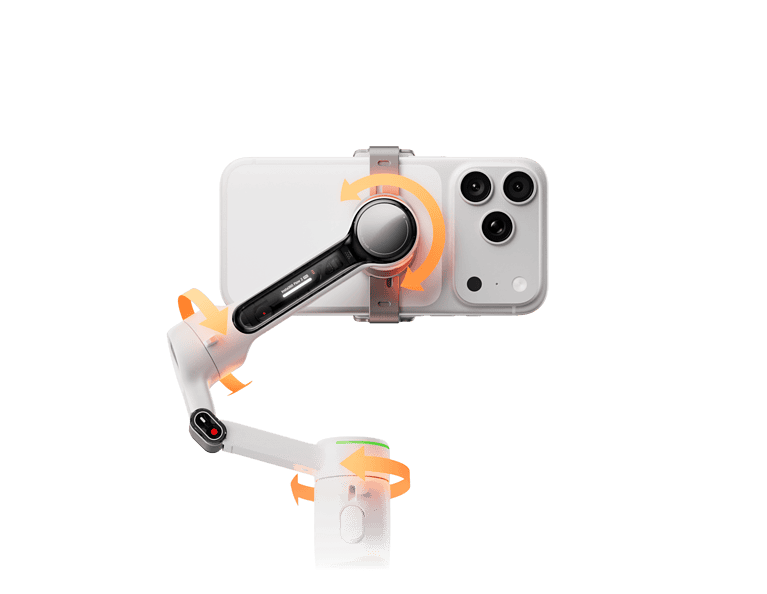
The three motors correct the orientation of a mounted camera. Walking also moves the entire camera upward and downward through space, which is a different physical motion. The gimbal may help keep the subject oriented consistently but cannot cancel every rise, fall or quick direction change. A longer lens can make small movements appear more pronounced than they do at a wider field of view.
Start with a filming objective
Before deciding to move the camera, identify what the shot is meant to communicate. A static close-up can emphasize a product detail, while a simple change in viewpoint can show the relationship between a subject and the surrounding scene. Movement is not an achievement on its own: it should make the image clearer, not more complicated.
Five habits that help controlled camera movement
- Choose an unobstructed setting: maintain ordinary awareness of the environment and avoid any filming that creates a trip hazard or distraction.
- Keep framing intentional: use a subject and a background that make it easy to evaluate whether the camera stays pointed where intended.
- Move naturally: avoid exaggerated postures and keep normal comfortable control of the filming equipment.
- Keep direction changes gradual: sudden pivots can make it difficult for a gimbal to follow the desired composition.
- Review samples: compare a short moving clip with a stationary version before committing to a complicated sequence.
Lens choice and field of view
A wide-angle lens can make small rotations and reframing changes less obvious, while a telephoto lens magnifies visible movement. Some electronic stabilization modes crop the field of view, changing how much of the scene appears on screen. Choose the visual style appropriate for the project; do not assume the gimbal can compensate for a lens that is poorly matched to the subject.

Understanding gimbal mode differences
Depending on the model, a gimbal may hold the camera orientation more firmly, allow a controlled follow behavior, or accept deliberate joystick movements. The precise modes and response characteristics differ between manufacturers and firmware versions. Check the product’s official manual rather than relying on generic mode names. Some smartphone tracking functions also require compatible recording apps and operating-system versions.
Why balancing and equipment fit matter
The motors are designed for a limited camera mass and geometry. A poorly balanced or unsupported camera setup can behave unpredictably or use more battery. For a smartphone, include the case in the weight and clamp dimensions. For a camera-and-lens rig, account for all accessories approved by the manufacturer. If the selected setup is not compatible, a technique cannot compensate for the mismatch.

Common footage problems
- The subject drifts out of the frame: this is often a composition or tracking issue, not just camera shake.
- Visible movement remains: vertical translation may still appear even after motorized correction.
- Motor behavior looks abrupt: the selected follow mode may not fit the intended shot or camera mass.
- Motion blur: shutter settings and lighting can affect the image independently of stabilization.
- Sound is poor: wind and handling noise require separate attention.
When to choose a stationary shot instead
For a product review, interview or presentation, a tripod can produce more repeatable framing. The audience generally benefits more from a clear subject and intelligible narration than from constant movement. A moving camera can be effective when it serves an obvious story purpose and does not interfere with ordinary safe movement.
Gimbal movement versus electronic stabilization
An action camera can stabilize its video internally, often by analyzing frames and cropping to reduce apparent movement. A powered gimbal physically rotates the camera to counter selected motion. They can complement one another, but the combination still cannot guarantee smooth footage. Our three-axis gimbal guide explains the distinction.
Frequently asked questions
Does a ninja walk remove all vertical motion?
No. It is a popular description for controlled camera movement, but the gimbal’s three axes do not mechanically eliminate all up-and-down translation.
Is a heavier gimbal always better?
No. Weight adds fatigue, while payload compatibility, lens choice, camera software and the filming goal determine practical usefulness.
Can I make a good video without a gimbal?
Yes. Stable stationary framing, good lighting and reliable sound often have more impact on basic video quality.
Related guidance
Compare equipment in our smartphone gimbal guide, action-camera comparison and handheld gimbal benefits article. This update provides general editorial advice and does not claim laboratory measurements or professional filming credentials.
Related reading: For outdoor scenery and responsible travel storytelling, consult this related GoGimbals article. For DSLR camera payload and balancing, consult this related GoGimbals article. For mirrorless camera gimbal buying criteria, consult this related GoGimbals article. For current smartphone tracking and compatibility, consult this related GoGimbals article.